What is Constructive Solid Geometry?
Constructive Solid Geometry, or CSG, is a class of 3D modelling techniques.
CSG involves taking primitive shapes, like spheres, cylinders and cubes, transforming them into a position, and then combining them with "Boolean operators", like intersection, union, and difference (or subtraction).
The Wikipedia article on Constructive Solid Geometry uses this diagram to explain it.
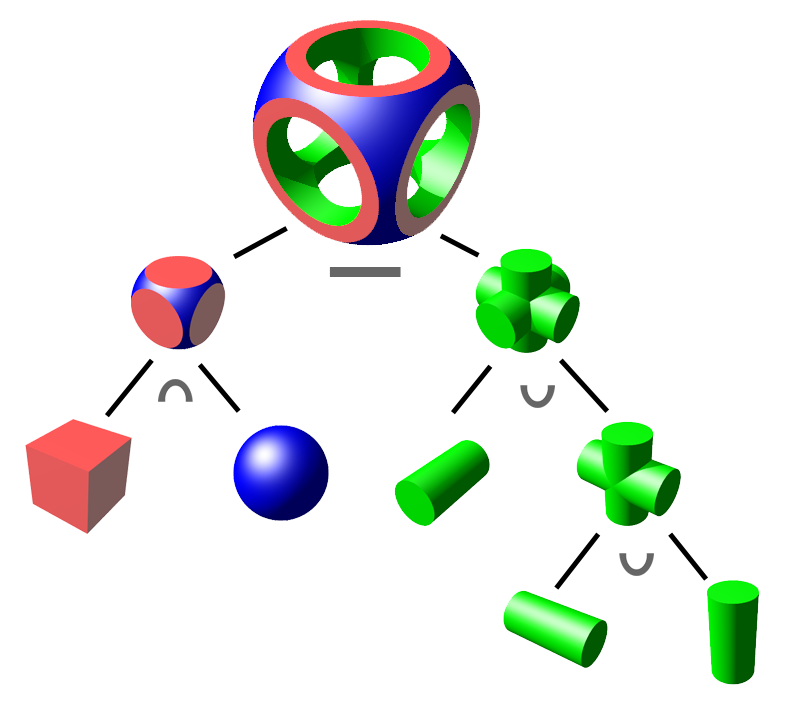
In this notebook I'm going to break this diagram down, using a Haskell library called Waterfall-CAD.
First we're going to write a little bit of code to let us view Waterfall-CAD solids in a Sabela notebook; this uses the modelviewer.dev JavaScript library. You should feel free to ignore this code block.
-- cabal: build-depends: waterfall-cad, linear, random
-- cabal: extra-lib-dirs: /opt/homebrew/opt/opencascade/lib
-- cabal: extra-include-dirs: /opt/homebrew/opt/opencascade/include/opencascade
-- The extra-*-dirs are macOS/Homebrew paths for OpenCASCADE (waterfall-cad's C++
-- backend); on Linux point them at your distro's opencascade install instead.
import qualified Waterfall as W
import Linear
import System.Random (randomRIO)

assetBase :: String
assetBase = "https://raw.githubusercontent.com/joe-warren/sabela/0b87c7bc183323cc38db5e5a2f20a500473a425a/waterfall/"

modelDir :: String
modelDir = "examples/data/waterfall/models"

viewerHtml :: String -> String
viewerHtml modelUrl =
  unlines
    [ "<script type='module' src='https://ajax.googleapis.com/ajax/libs/model-viewer/4.3.1/model-viewer.min.js'></script>"
    , "<model-viewer"
    , "  src='" <> modelUrl <> "'"
    , "  environment-image='" <> assetBase <> "lighting.hdr'"
    , "  ar shadow-intensity='1' camera-controls touch-action='pan-y'"
    , "  style='width:100%;height:400px'>"
    , "</model-viewer>"
    ]

displayWaterfall s = do
  i <- randomRIO (0, 1000000 :: Int)
  let modelFile = modelDir <> "/" <> show i <> ".glb"
  W.writeGLB 0.01 modelFile (W.rotate (unit _x) (pi / 2) s)
  displayHtml (viewerHtml ("/api/asset?path=" <> modelFile))
In CSG modelling, you start with simple "primitive" shapes, such as a cylinder.
displayWaterfall W.unitCylinderPrimitives can be transformed, for instance by scaling them.
scaleFactor = V3 1 1 3.5

scaledCylinder = W.scale scaleFactor W.centeredCylinder
displayWaterfall scaledCylinder
Or by rotating them.
In Waterfall-CAD, rotations are specified in radians, so a quarter turn is a rotation of π/2.
rotatedCylinder = W.rotate (unit _y) (pi/2) scaledCylinder
displayWaterfall rotatedCylinder
CSG modelling is all about using "Boolean operators" to combine pairs of solids.
One of the most common Boolean operators is "union", which merges the volumes of the two shapes.
In the Wikipedia diagram, "union" was represented with the "∪" character.
Merging our cylinder with the rotated cylinder gives us a cross shape.
cross = scaledCylinder `W.union` rotatedCylinder
displayWaterfall cross
Because "union" is such a useful operator, Waterfall-CAD uses it in the Monoid instance for Solids, which means we can union two solids together using the <> operator.
threeDCross = cross <> W.rotate (unit _x) (pi/2) scaledCylinder
displayWaterfall threeDCross
Waterfall-CAD has other primitive solids, such as cubes.
cube = W.scale 3 W.centeredCube
displayWaterfall cube
And spheres.
sphere = W.scale 2 W.unitSphere
displayWaterfall sphere
Another Boolean operator used in CSG modelling is "intersection", which takes the region common to two solids.
roundedCube = cube `W.intersection` sphere
displayWaterfall roundedCube
The last CSG modelling operator we're going to use is "difference" (sometimes called subtraction).
This is used to remove one solid from another.
shape = roundedCube `W.difference` threeDCross
displayWaterfall shape
And with that, we've built the solid from the diagram.